
The quiet layer: where to find, make, and host your basemaps
Find, make and host free basemaps for MapLibre, QGIS and tools like GOAT — open editors (Maputnik, MapTiler, Mapbox) and ready styles (OpenFreeMap, Protomaps, Stamen).

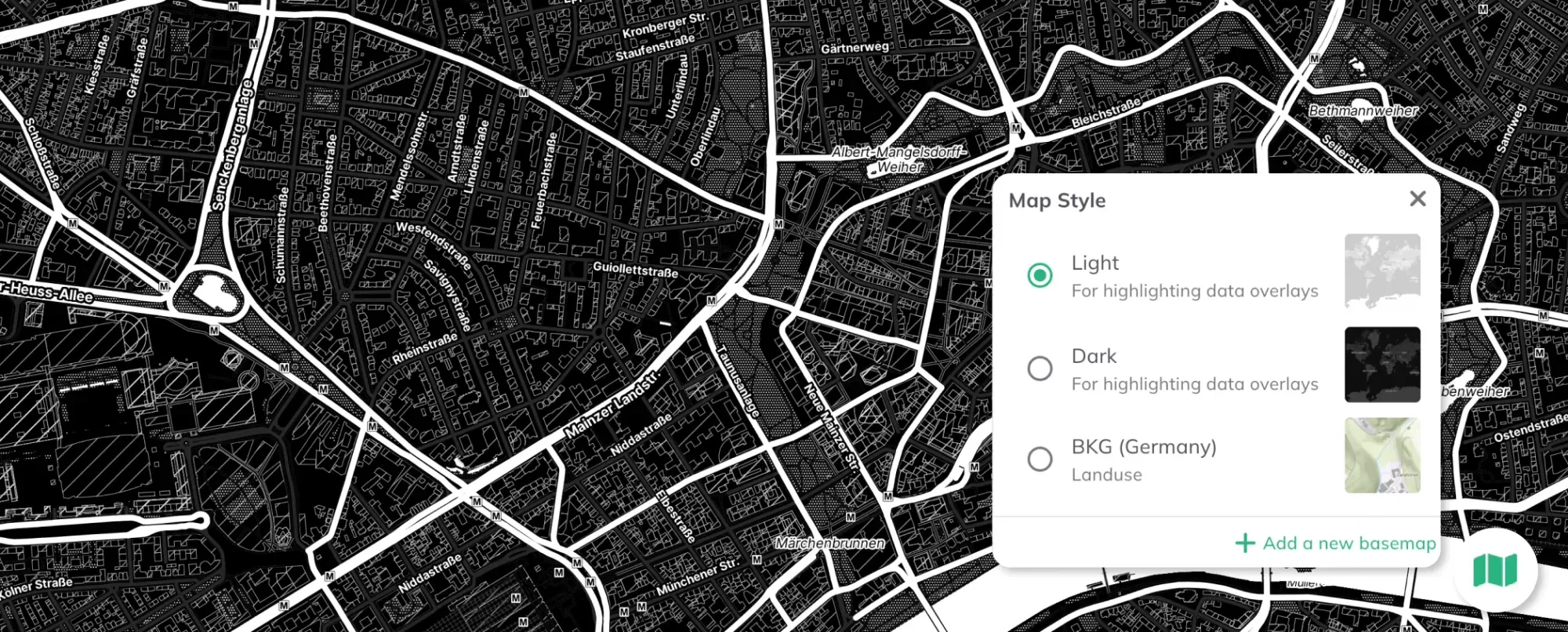
The basemap is the part of most interactive maps we don’t have the time — or maybe the will — to really design. We pick the regular one, the dark one, the satellite image, or the white one — and that’s that. We don’t get into the detail of it; we care about the layers we put on top. And to an extent, that’s fine. Sometimes it’s enough: there’s not much time, the deadline’s there, you submit. But, let’s be sincere, we can all feel the difference when a basemap was actually designed for the map. A basemap’s whole job is to hold everything together without being noticed. Make it loud and it fights your data; make it quiet and it gets out of the way, so the story on top can read.
Take the two maps below. The one on the left, “Nahes Grün, Fernes Grün,” uses a basemap built for that specific map. The one on the right uses a standard OSM white style. It’s not that the right one is wrong — it works fine. It’s just that the left one fits: the basemap and the data feel like they belong to the same map, instead of one sitting on top of the other.
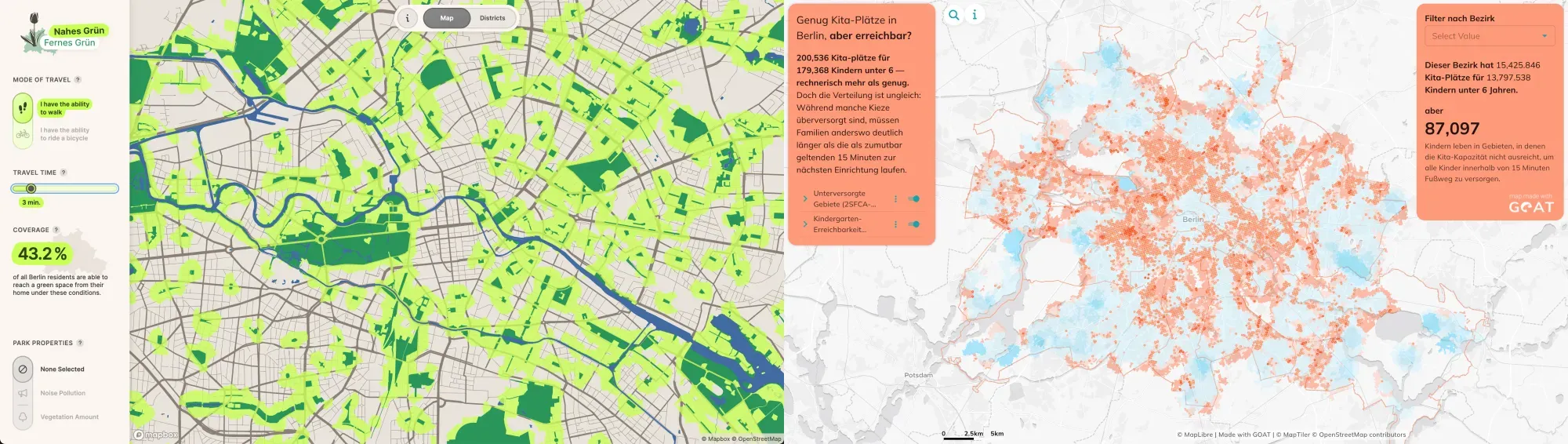
On the left the “Nahes Grün, Fernes Grün” (https://uclab.fh-potsdam.de/mapping/nahesgruen/) by a group of students at the Potsdam University. On the right, “Genug Kita-Plätze in Berlin, aber erreichbar?” dashboard made with GOAT
On the left the “Nahes Grün, Fernes Grün” (https://uclab.fh-potsdam.de/mapping/nahesgruen/*)*by a group of students at the Potsdam University. On the right, “Genug Kita-Plätze in Berlin, aber erreichbar?**”**dashboard made with GOAT So it’s worth being conscious about the decision: do I want to build my own style, or grab a finished one? Either way, you need to know where to design one or where to find one. Maybe you’ve heard of Mapbox, or the Stamen maps — there are many, and they don’t all do the same thing. Most people pick one provider early on and never look again, but there’s a much wider spectrum, and once you know it, the choice stops being “the default my library shipped with” and starts being a design decision.
Option A: Build your own basemap
These are editors. You open a map, change how it looks, and get a style out the other end.
1) Maputnik - The open option
**A style editor that runs entirely in your browser.**You can open an existing style or start from a blank canvas, then edit every layer: colours, fonts, what appears at which zoom level. No account, nothing leaves your machine. It’s free and fully open source (MIT), maintained by the MapLibre community.
Here’s the catch, and it’s a real one: Maputnik is only an editor. It hands you the finished style as a downloaded style.jsonfile (or a GitHub Gist) and stops there. There’s no hosted style URL. So the moment a tool (like GOAT) asks you to paste a link to your basemap, you need to host the file yourself. In that case, you can Import the JSON into MapTiler or Mapbox, hit publish, and they give you a proper style URL.
One thing to keep in mind: the style file is just a recipe. It points at the map tiles — it doesn’t contain them. So wherever you host the file, the actual tiles still have to come from somewhere (which is exactly what the other tools below sort out).
Cost: Maputnik itself is free, no paid tier. Hosting the style file is free or nearly free almost anywhere. If you point at a provider like MapTiler or Mapbox, they’re free up to a certain amount of traffic each month and paid above that. For a map that isn’t heavily visited (5.000/month for MapTiler and 50.000/month for Mapbox, as of 2026), you’ll most likely stay in the free range.
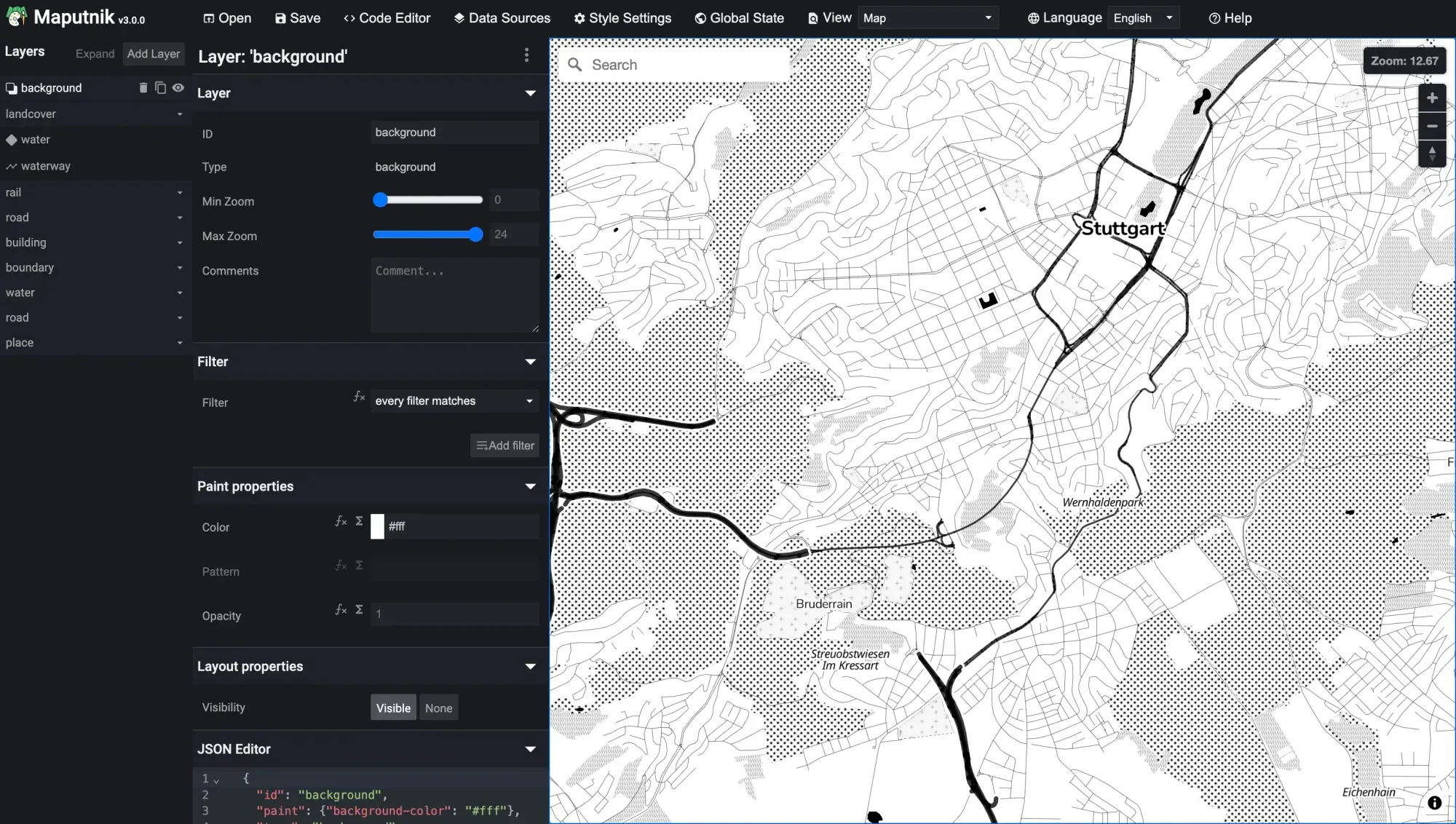
Maputnik editor front-end
2) MapTiler — The map designer
Pick one of their ready basemaps, customise a copy (colours, typography, toggling whole categories of layers on and off), or build a style from scratch and upload your own data. When you’re done, hit Save & Publishand you get a link / API endpoint you can drop straight into a website, into QGIS, or into GOAT — and you can even connect MapTiler to QGIS to edit from there.
**This is the path I reach the most when I want that open-editor feel without running any hosting myself: design in MapTiler, publish, done. Or skip the design step entirely and take one of their ready-made, **optimised styles from OpenMapTiles.
Cost: Free account to start and design. Paid plans (Flex / Unlimited / Custom) once you pass the free request quota (5.000 loads). It’s a hosted platform, not open source — but built on open data and tools.
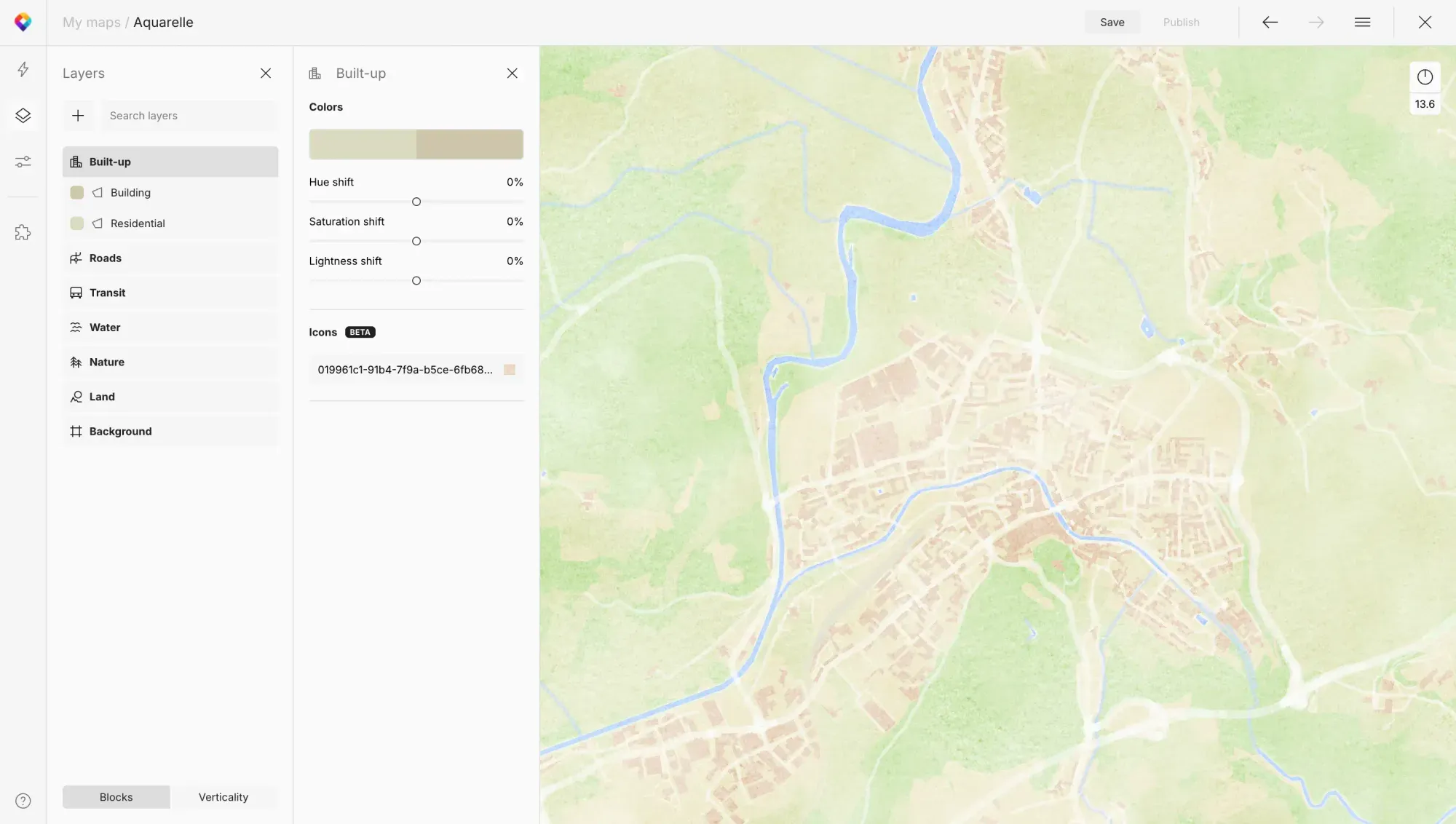
MapTiler editor front-end
3) Mapbox Studio - The ArcGIS of Basemaps
The original polished editor— granular control over every layer, a big icon and component ecosystem, very smooth output. You create, edit, host and serve all in one place, and publishing gives you a style URL.
**Fun bit of history:**Mapbox is exactly why MapLibre and Maputnik exist. Mapbox’s rendering library went closed source at v2, and the community forked the last open version into MapLibre GL. So a lot of the open tooling above is, in a roundabout way, descended from Mapbox Studio.
Cost: Free tier with monthly limits (50.000 loads), then pay-as-you-go. Proprietary platform.
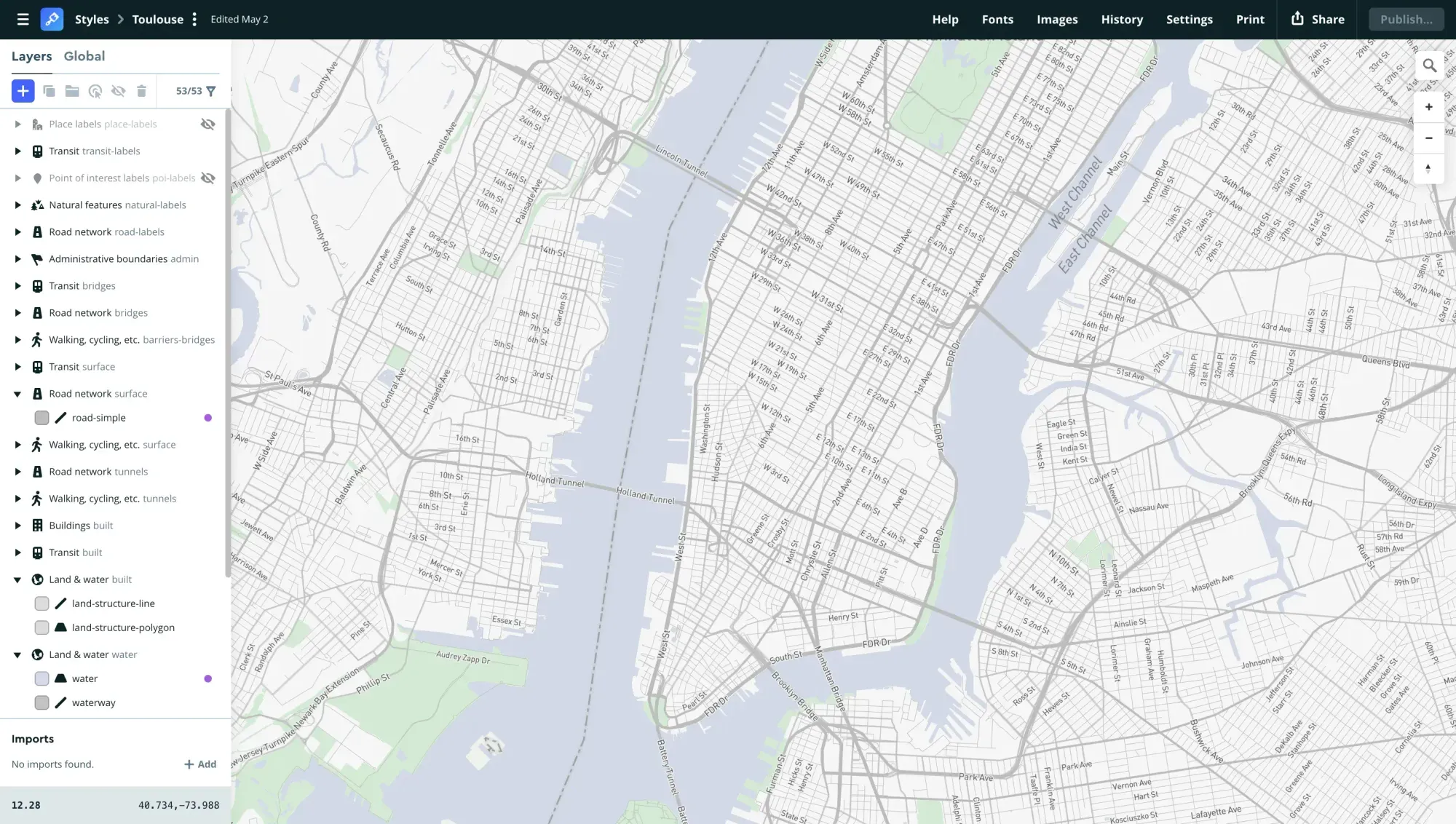
Mapbox editor front-end.
Option B: Grab a finished style
No editing. You take a style someone else designed and host and just plug it in.
1) OpenFreeMap
The newer one worth knowing about. Completely free OSM-based vector tiles — no API key, no account, no request limits on the public instance — or self-host the entire stack yourself if you’d rather not depend on anyone. It ships with a few ready styles (see the image down). The public service runs on donations, which is worth keeping in mind before you point a million daily views at it.
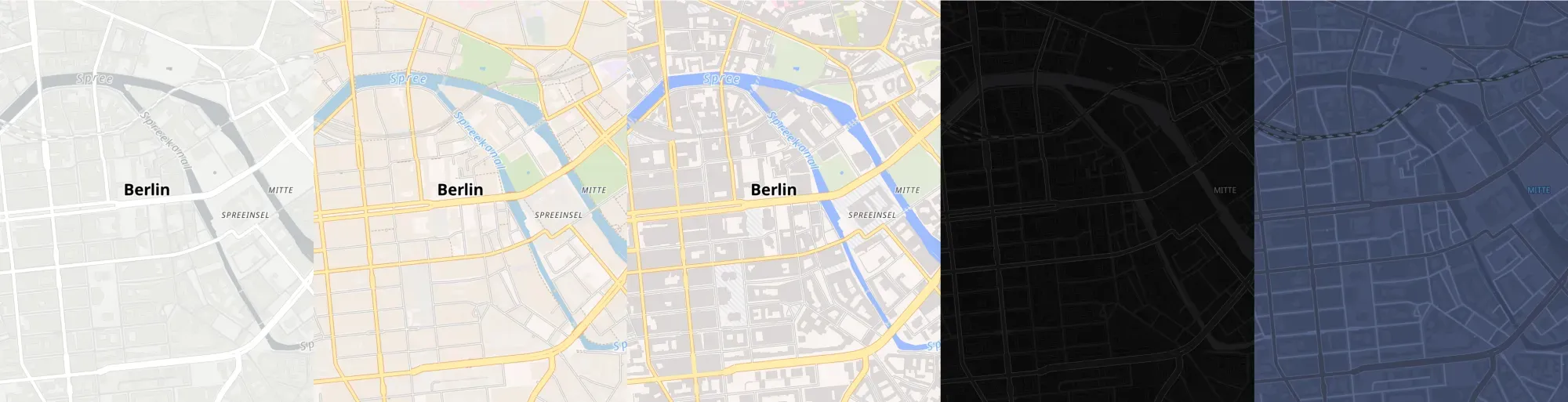
Maps available on OpenFreeMap. From left to right: Positron, Bright, Liberty, Dark, Fiord.
To use one of these styles, you just need to paste one of the OpenFreeMap quick-start
list into GOAT, like
https://tiles.openfreemap.org/styles/positron — swap the last word for bright,
liberty, dark, or fiord.
Cost: Free, open source (MIT).
2) Protomaps
The techy, fully-open option, and the most different from everything else here: the entire planet’s basemap as a single file (PMTiles) that you can host yourself — even on plain static storage, with no tile server running. The styles come in “flavors” (see the image down) and are open source, generated from their code or styled in Maputnik.
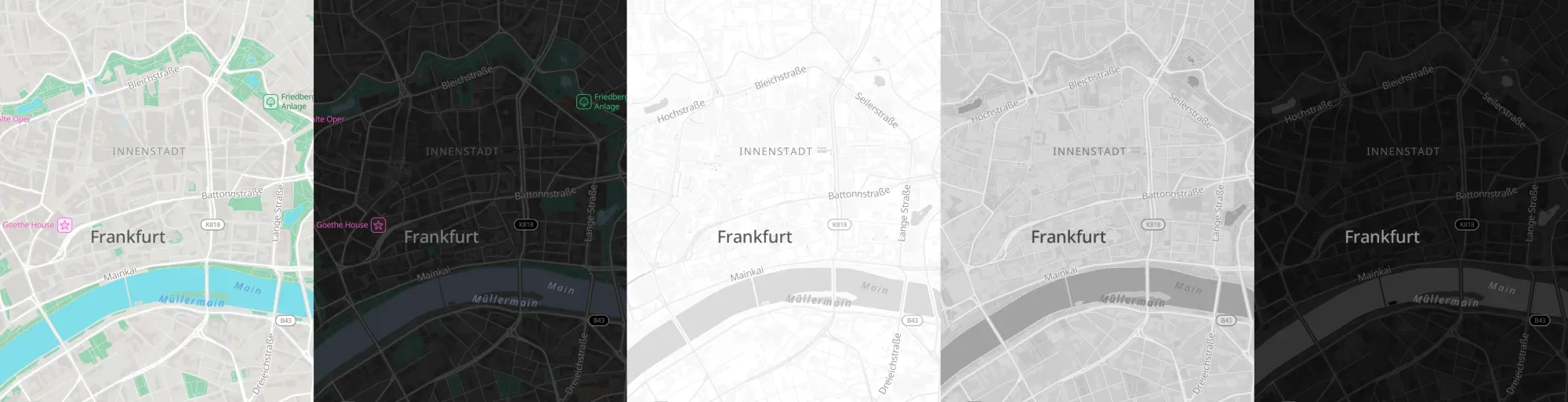
Maps available on Protomaps. From left to right: Light, Dark, Data Viz (White), Data Viz (Gray) & Data Viz (Black)
The thing to understand: the GitHub repo is source code, not a link you paste. The files in there — including the sprite sheets — generate styles; they aren’t hosted endpoints. So to use the basemaps in GOAT or in other apps as a link, you need to:
- Make a free Protomaps account and grab an API key.
- Choose one of their defined “Flavors” (mapbase styles).
- The link you will need to connect in GOAT or in other apps, looks roughly like
https://api.protomaps.com/styles/v5/black/en.json?key=YOUR_KEY. - Paste that link as your basemap and you’re done, no file hosting on your side.
Cost: Free, open source. Free hosted API tier with a key; self-hosting is unlimited and entirely yours.
3) Stadia Maps / Stamen
This is where the Stamen styles live now— Toner, Terrain and Watercolor — hosted by Stadia after Stamen stepped back from running the tile service themselves. You just plug them in. Stamen is one of the studios I admire most, so I’m quietly glad these iconic styles are still alive and maintained rather than archived.
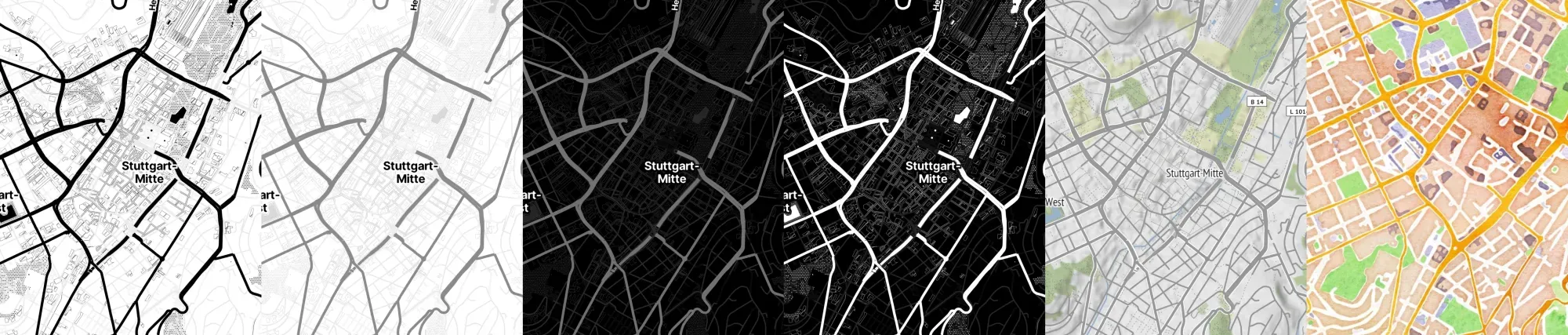
Stamen maps at Stadia. From left to right: Toner, Toner Lite, Toner Dark, Toner Blacklite, Terrain and, Watercolor
To use these styles you need to:
- Make a free Stadia account and grab an API key.
- You want the style JSON, at
tiles.stadiamaps.com/styles/ .json, with your key on the end. For Toner, that’s:https://tiles.stadiamaps.com/styles/stamen_toner.json?api_key=YOUR-API-KEY - Swap
stamen_tonerforstamen_terrain,stamen_toner_lite, orstamen_watercolor, paste it into GOAT, and you’re set — one key covers the tiles, fonts, and icons the style pulls in. Just remember to credit Stadia, Stamen, OpenMapTiles, and OpenStreetMap on the Attribution when adding the style to the basemaps in GOAT.
Cost: Free tier for non-commercial use; paid plans for commercial or high-volume use.
4) Official maps from governments
Here’s a source that’s easy to forget: national mapping agencies make their own basemaps, and they’re often gorgeous, accurate, and free. These are the people who’ve been mapping their country properly for a century or two. And increasingly they don’t just give you a viewer to look at — they hand you modern vector tiles or a style JSON you can plug straight in.
- Germany — basemap.de from the BKG: colour, grey and relief styles under CC BY 4.0, plus a basemap.world version for global coverage.
- Austria — basemap.at: official administrative data under the Open Government Data licence (a new vector version is due in Q3 2026).
- Switzerland — swisstopo: benchmark-quality cartography covering Switzerland and Liechtenstein.
Each of those pages lists the style JSON links — grab the one you want and paste it into GOAT, same as the others above.
Two things to keep in mind. They usually cover one country only, so they shine for national or regional work rather than something worldwide. And “free” comes with strings: nearly all of them ask for attribution — a small “© GeoBasis-DE / BKG” or similar — so check the licence and credit them properly.
Putting the basemap to work
Here’s the part that closes the loop. Designing a basemap can be satisfying — but it can also eat a lot of time. Every zoom level, every label, everything you want to tweak. Sometimes that effort is worth it: you need it on-brand, or you’ve got the time and budget to make it really yours. And sometimes it’s just not necessary — a ready-made style does the job fine, and your hours are better spent on the data on top.
In GOAT, Plan4Better’s open-source accessibility and WebGIS platform, you can now upload your own basemap — paste in a hosted style link and analyse on the map you actually chose, instead of whatever default you were stuck with. It sounds like a small thing. But there’s a real difference between running an accessibility analysis on a generic grey tile and running it on a basemap you tuned so your results sit cleanly on top. The map you designed becomes the map you think on.
A poem on which to pick
If you want to make something: Maputnik, if you want fully open and don’t mind sorting out hosting. MapTiler or Mapbox, if you’d rather design and publish in one place.
If you just want a good finished style: OpenFreeMap, for clean under-data backdrops. Stadia/Stamen, when you want character. Protomaps, when you want to own the whole thing.
And honestly, the best basemap is usually the one you stop noticing. If you’ve ever stared at a map and thought “something’s fighting my data” — that something is almost always the layer underneath. Worth getting it right.
So I’ll ask the same thing I keep asking myself: are you a Positron-under-everything person, or do you rebuild your own every time?
Frequently asked questions
Can I use OpenStreetMap directly as a basemap?
Not as a paste-in style. The classic OpenStreetMap map is raster tiles meant mainly for viewing, with no style JSON to drop into a tool. For a ready style URL, use an OSM-based provider like OpenFreeMap, MapTiler, or a national mapping agency — they all build on OSM data.
How do I add a custom basemap to GOAT?
Host your style as a style JSON URL — publish it from MapTiler or Mapbox, or use a ready link from OpenFreeMap, Protomaps, Stadia, or a government service — then paste that link into GOAT's basemap field. GOAT reads the hosted style and renders it under your data.
Are free basemaps really free?
The editors and styles usually are. What can cost money is traffic: hosted providers like MapTiler and Mapbox are free up to a monthly request limit and paid above it, and some services charge for commercial use. Fully open options like OpenFreeMap and self-hosted Protomaps have no request limits.
What's the difference between vector and raster basemaps?
Raster basemaps are pre-rendered image tiles, so you can't restyle them on the fly. Vector basemaps send the underlying data and style it in the browser, letting you change colours, fonts, and what shows at each zoom level. Most modern tools, including GOAT, expect a vector style JSON. So I'll ask the same thing I keep asking myself: are you a Positron-under-everything person, or do you rebuild your own every time?