August 5, 2026
Insights
.png)
Parking spaces reserved for people with mobility impairments (wheelchair users and others who rely on disabled parking bays) can be found across our cities and towns. But considering their limited availability and scale, how useful are they in reality, without reliable and up-to-date information? That gap between infrastructure existing and infrastructure actually being usable is what the Park-Stark app aims to bridge.

Park-Stark, built for the city of Mannheim and other regions in Baden-Württemberg, is now one of the few open-source, modular, cross-platform (Android & iOS) mobile apps built for accessible, barrier-free navigation in Germany.
The starting point was a simple idea: most navigation apps are built for an imagined "average" user, and accessibility gets added afterwards. We wanted to invert that. The primary users here are people with mobility and vision impairments; this needed to be at the core of how we approached app design and usability.
The following guiding principles are at the crux of the project:
Park-Stark relies on a three-tier system architecture that makes the core features of the app possible.
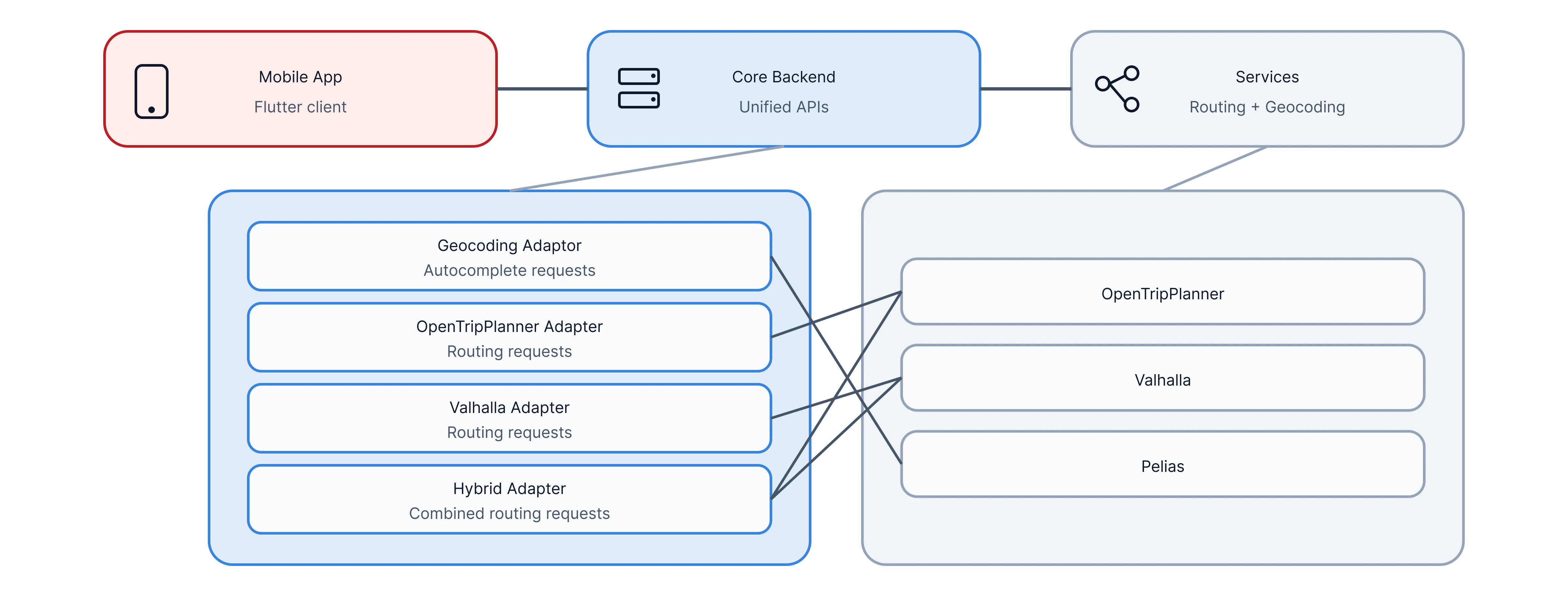
Each service is good at one thing: OpenTripPlanner handles multi-modal and transit routing, Valhalla produces precise step-by-step navigation instructions, and Pelias does the geocoding and search autocomplete that turns "Hauptbahnhof" into actual coordinates. These services run on our servers with custom localised datasets.
Check them out on GitHub:
In addition to these — and crucial to the success of this app — is open real-time data from the state of Baden-Württemberg. The app fetches real-time data regarding the location and occupancy status of parking spaces across the state directly from the ParkAPI service.
In between the services and mobile app layers, sits a Python core backend whose job is that of an intermediary: it talks to several specialised routing and data services and presents the app with one clean, unified set of APIs, so the app never has to care which service answered a given question. Thanks to an adapter-based design, new data providers or services can be plugged into the platform quickly in the future, without breaking existing functionality.
The app itself is built using the Flutter framework, so a single codebase enables both Android and iOS support without inconsistencies or duplicated maintenance. A consumer-notifier based state management approach with MVVM architecture was used to keep each layer within the mobile app's codebase structured and modular.
The payoff of all this separation is that supporting a new region isn't a massive effort. You bring the local data, update configuration files, and have a working accessible navigation app for a new city.

The part I find most genuinely interesting is what I'd call the app's second interface. Alongside the visual one you see, there's a parallel layer built for assistive technologies — the screen readers that blind and low-vision users rely on. Getting this right means every element on screen carries proper semantic meaning, not just a visual position: a button announces what it does, a route step reads out as a sentence that makes sense out of context, the structure of a screen is something you can navigate by listening rather than looking. The very nature of this feature required feedback from the users who'd be relying on it; getting live inputs from a testing group organised by the city of Mannheim was invaluable to iterate and make sure it works the way it needs to.
This commitment to visual accessibility flows through various aspects of the app, including map markers that indicate parking spaces’ real-time occupancy status: a bold green circle for available, a red square for occupied, and a blue hexagon for unknown.

And that brings me to navigation. What happens once you've found a parking space you'd like to get to? Park-Stark offers users the option of internal or external navigation. While external redirects you to other mapping apps installed on the device (Google or Apple Maps, Waze and others), internal navigation offers a complete step-by-step navigation experience within the app. This was a highly complex feature we built entirely from the ground up. Based on route planning results from Valhalla and OpenTripPlanner, the app handles position tracking, displays a step-by-step view, provides audio cues at various distance intervals, and guides the user to the parking space.

At times however, a parking space you're driving to could get occupied by someone else while you're on the way there. What next? The app constantly monitors this in the background while you're navigating there, and alerts you if this happens. Then, it provides you with the choice of finding alternative available spaces within a customisable radius of your destination, or continuing navigation.
There couldn't be a better testimony to the app's utility and design than one directly from a user. Here's a lovely video documenting the experience of a Mannheim resident using the app in their daily life.
Park-Stark is live for Mannheim and other regions in Baden-Württemberg on Google Play and the App Store. The fully open-source codebase can be found here on GitHub.
Are you curious about this project, or interested in deploying it in your city? Reach out to us via the contact page!
Park-Stark is an open-source, cross-platform mobile app (Android and iOS) that helps people with mobility and vision impairments find and navigate to accessible parking. It's built for the city of Mannheim and other regions in Baden-Württemberg, and the whole codebase is open on GitHub.
Right now it's live for Mannheim and several other regions in Baden-Württemberg. Because the platform is modular, supporting a new city is mostly a matter of bringing in the local data and updating the configuration files — not rebuilding the app.
Both Android and iOS. It's built with Flutter, so a single codebase runs on both — which keeps the experience consistent and saves us duplicating maintenance.
Yes, fully. The entire codebase is on GitHub, and the platform is deliberately built to be reused and customised by other cities and regions.
Yes. Park-Stark is free to download on Google Play and the App Store, and the entire codebase is open source on GitHub — free to use, reuse, and customise.
It pulls real-time data on the location and occupancy of accessible parking spaces straight from the ParkAPI service run by MobiData BW. And if a space you're heading to gets taken while you're on the way, the app notices, alerts you, and offers alternatives within a radius you can set.
Alongside the visual interface there's a parallel layer built for screen readers, so every element carries proper meaning rather than just a position on screen — a button announces what it does, a route step reads out as a sentence that makes sense on its own. We built and refined that with a testing group organised by the city of Mannheim.
Plan4Better, for the city of Mannheim and partners in Baden-Württemberg — using open-source routing and geocoding services (OpenTripPlanner, Valhalla and Pelias) and open real-time data from the region.
Insights
GOAT