Plan4Better

Changelog

What changed in GOAT, and what it means for your work.

RSS feed

22 changes

October 2026

Enhancement13 October 2026

Closest-average heatmaps without a travel time limit

When you set a Reference area in Heatmap - Closest Average, the travel cost Limit no longer applies for walking, cycling, pedelec and car. Destinations outside the area count too, and every cell gets its real average travel cost, however far away the destinations are. Cells that are not reached within a limit no longer drop out of the result.

Public transport still uses the Limit. A reference area can cover at most 200,000 cells for walking, cycling and pedelec, and 40,000 for car.
Fix13 October 2026

Fixes in v3.0.9

  • Accepting an invitation to an organization no longer keeps the roles you held before. You get the role you were invited with, and a user who already belongs to an organization can’t accept a second invitation.
New11 October 2026

Number fields that count up on their own, and unique IDs

Two new field types let GOAT fill in a value for every new feature, whether you draw it, add it in a table or create it in a batch. A serial field gives each feature the next running number, starting where you choose, and never hands out a number twice, even after a feature is deleted. A UUID field gives each feature a unique ID.

New11 October 2026

Templates can give every user their own copy of a dataset

When you save a template, you now choose for each dataset how the people who use it receive it. A dataset can still be shared read-only. It can also be copied, so that every user gets their own editable version, either with all its rows or empty, with only the fields, field settings and style.

Enhancement11 October 2026

Shared templates show up under the space they were shared into

A template shared with your organization or team used to appear only under Everyone in the template list, although Content showed it inside the organization space. The Organization and Team filters now find it too, whether it was shared on the template itself or on a folder above it.

A new source, Shared with me, lists templates that were shared with you alone. Each template is listed under the space it was shared into. This works in the workflow, layout and Home template pickers.

Enhancement11 October 2026

Zoom the workflow canvas out much further

The workflow canvas used to stop zooming out at half size, which is too close to see a large workflow as a whole. It now zooms out to a tenth.

Enhancement11 October 2026

Workflow variables can have a label and a description

A workflow variable keeps its technical name for references such as {{@name}}. It can now also have a display label and a short description, so people who run your workflow see what each value is for.

Fix11 October 2026

Fixes in v3.0.8

  • Copying or importing a project no longer changes numbers in the Dashboard that only looked like layer IDs, such as shadow or opacity. These copies could not be opened before.
  • Dashboard interaction rules, such as visibility sync and tab switching, work in a copy or import of a project. They used to keep pointing at the original.
  • Blank lines in a Dashboard’s rich text are kept instead of disappearing.
  • The first run of a workflow in a copied project, or a project made from a template, keeps the description, tags and column settings of the layer it replaces.
  • An empty layer, such as one you draw your planning into, keeps its geometry through export and import. It can be shown again and used in workflows.
  • A custom SQL node no longer fails on an empty intermediate result when it uses spatial functions.
  • Stray bounding-box columns from older GOAT versions no longer show up in field lists or get carried into joins, SQL and tool results.
  • The workflow preview of a join lists the columns the run really writes, with the join_ prefix. A SQL node written against the preview no longer fails.
  • Using a template inside a project shows the layers it adds right away, without a reload.
  • Someone who may use a template that was shared through a folder can now read the datasets it ships. Projects made from it no longer miss those layers.
  • Sharing a template with a person, team or organization outside your own organization is refused before anything is saved.
  • In a print layout, Verdana, Garamond and Consolas print in fonts of similar width, so text wraps as it does in the editor.
  • Legend labels you edit in place wrap at spaces, so a title no longer pushes the last legend entry out of its box in print.
  • Opportunity inputs in workflow tools show a proper label as tooltip instead of a generated title.
  • More of the German interface is translated, and dates in the header, job list and time picker follow the language.
New7 October 2026

Ask for help and follow your support tickets inside GOAT

You can now open a support ticket from the support menu in the GOAT header, attach files, and follow the conversation inside GOAT. When our team replies, you get an email with a link back to the ticket.

You can answer, mark a ticket as solved, reopen it, and rate the help you got. Owners and admins of an organization see all of its tickets. The link to the documentation has moved into the same menu.

Enhancement7 October 2026

See which steps of a workflow you cannot run, and why

In a shared project, a workflow can use datasets you are not allowed to read. Until now the run failed with “Resource not found” and nothing more.

Now the workflow editor marks the affected nodes as failed, names them, and suggests what to do: ask the owner to share the datasets, or use Replace datasets… to choose your own.

Enhancement7 October 2026

Workflow templates keep the style of their results

When you save a workflow as a template, GOAT now remembers how you styled each exported result. Anyone who uses the template gets the same colours and symbols on their first run, instead of the tool’s default style.

Project templates already worked this way. An export that never ran before you saved the template still uses the default style.

Fix7 October 2026

Fixes in v3.0.7

  • Workflows run again when their network is left on the default network.
  • ÖV-Güteklassen use the name and position of the main station, not of one of its platforms.
  • When you export a project, its workflows take along the datasets they use, as long as you can read them. A dataset you cannot read is left out, and the workflow asks for a new one after the import.
Fix6 October 2026

Fixes in v3.0.6

  • A project’s custom basemap now always shows when you open the project. You no longer briefly see the previous project’s basemap.
  • In a folder with many datasets, folders and projects are listed first instead of moving to later pages.
  • Styling and filtering by a yes/no field now works correctly.
  • Datasets shared with a team or organization now appear when you add a layer from that space, not only on the Content page.
  • Uploading a dataset is called Upload dataset everywhere, with the same icon.
  • Searching the Catalog with an area filter uses the exact shape of the area instead of a rectangle around it, so the results fit the area better.

September 2026

Fix30 September 2026

Fixes in v3.0.5

  • Line layers have an opacity slider under Color, and an opacity of 0 is kept when you save.
  • Switching the colour palette keeps your custom break values.
  • Unsaved changes to a custom colour scale are kept when you switch No data on or off.
  • When you choose a field to size by, the size range starts at the current size instead of at 0.
  • The data table keeps the current page visible while the next one loads.
  • Long link labels in a dashboard’s Links widget wrap instead of running past the panel.
  • Where a name is cut off, the full name shows when you hover over it.
Fix27 September 2026

Fixes in v3.0.4

  • The scale bar shows full numbers instead of abbreviations with K and M.
  • In a workflow, a catchment area with several starting points from a previous step now fills in its input correctly.
  • Catalog search gives more weight to datasets that cover the area you are looking at.
Enhancement23 September 2026

Know which starting point each catchment area belongs to

When you calculate separate catchment areas for several starting points, each area now has an origin field that says which starting point it comes from. You can label, filter or style the areas by it.

Fix23 September 2026

Fixes in v3.0.3

  • Catalog text search finds datasets more reliably.
  • The Join tool is faster and handles large datasets without running out of memory.
  • Tools no longer add extra bounding-box columns to their results.
New14 September 2026

Run accessibility analyses on a network you bring yourself

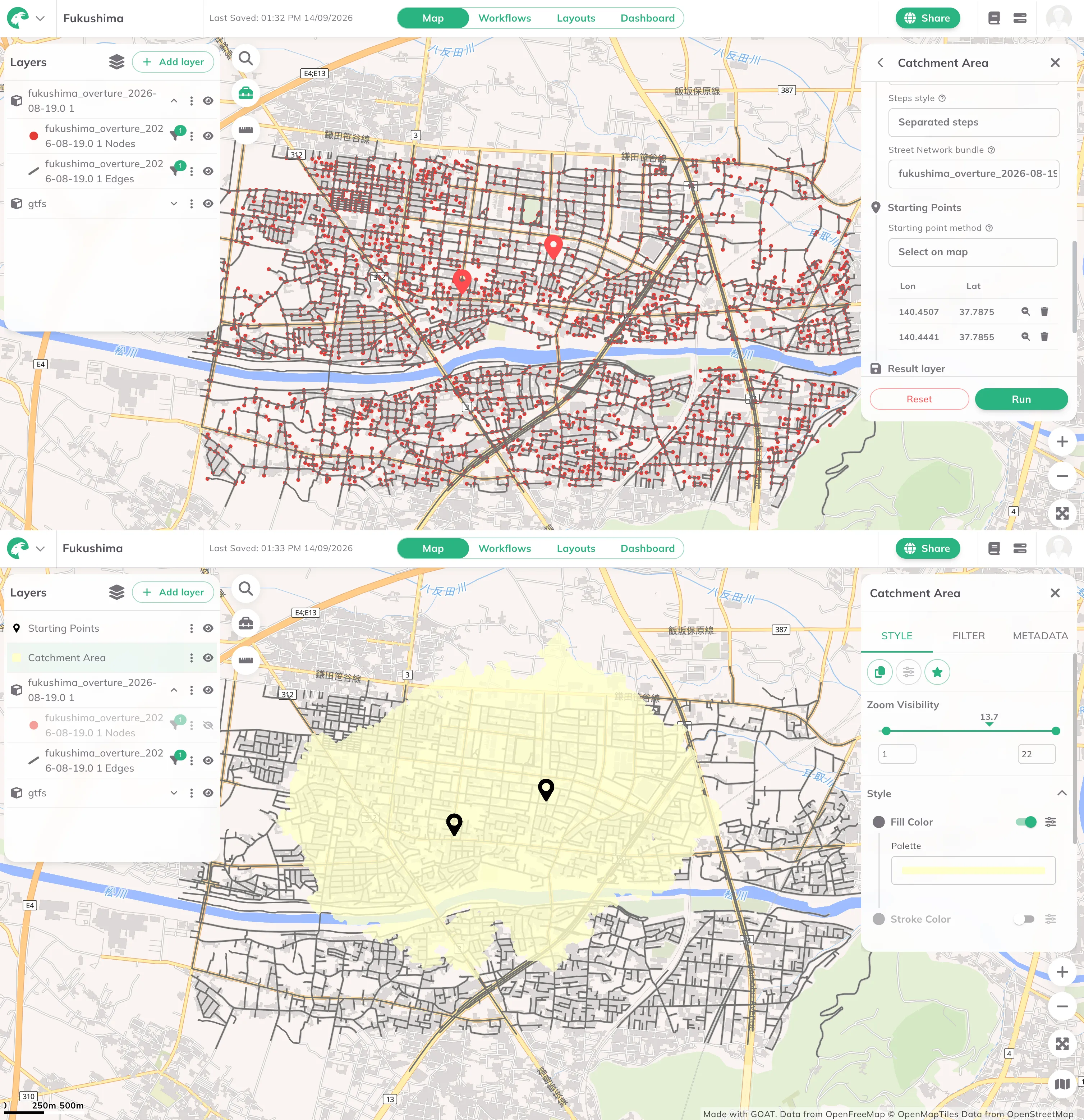
Until now, accessibility analyses ran on the routing networks we provide, and that also set the limits of where GOAT could be used. In v3 you upload your own network and the analyses run on that.

Take Fukushima. We do not provide a routing network there, so the accessibility indicators had nothing to run on. Upload the street network and a Catchment Area works the way it does in Munich. The same holds for public transport: bring the GTFS data for the region and the transit indicators run on it.

That covers two different situations. One is geographic, everywhere we do not already cover, which is most of the world. The other is local: a planned cycle network that does not exist yet, a campus network that is not in OpenStreetMap, or a national dataset a planning office trusts more than the open one. The network arrives in the Overture format, a .zip containing segments.geoparquet and connectors.geoparquet.

Two views of the same map in Fukushima: the uploaded street network drawn as nodes and edges, and a Catchment Area computed from two starting points on it
New14 September 2026

A Home screen that picks up where you left off

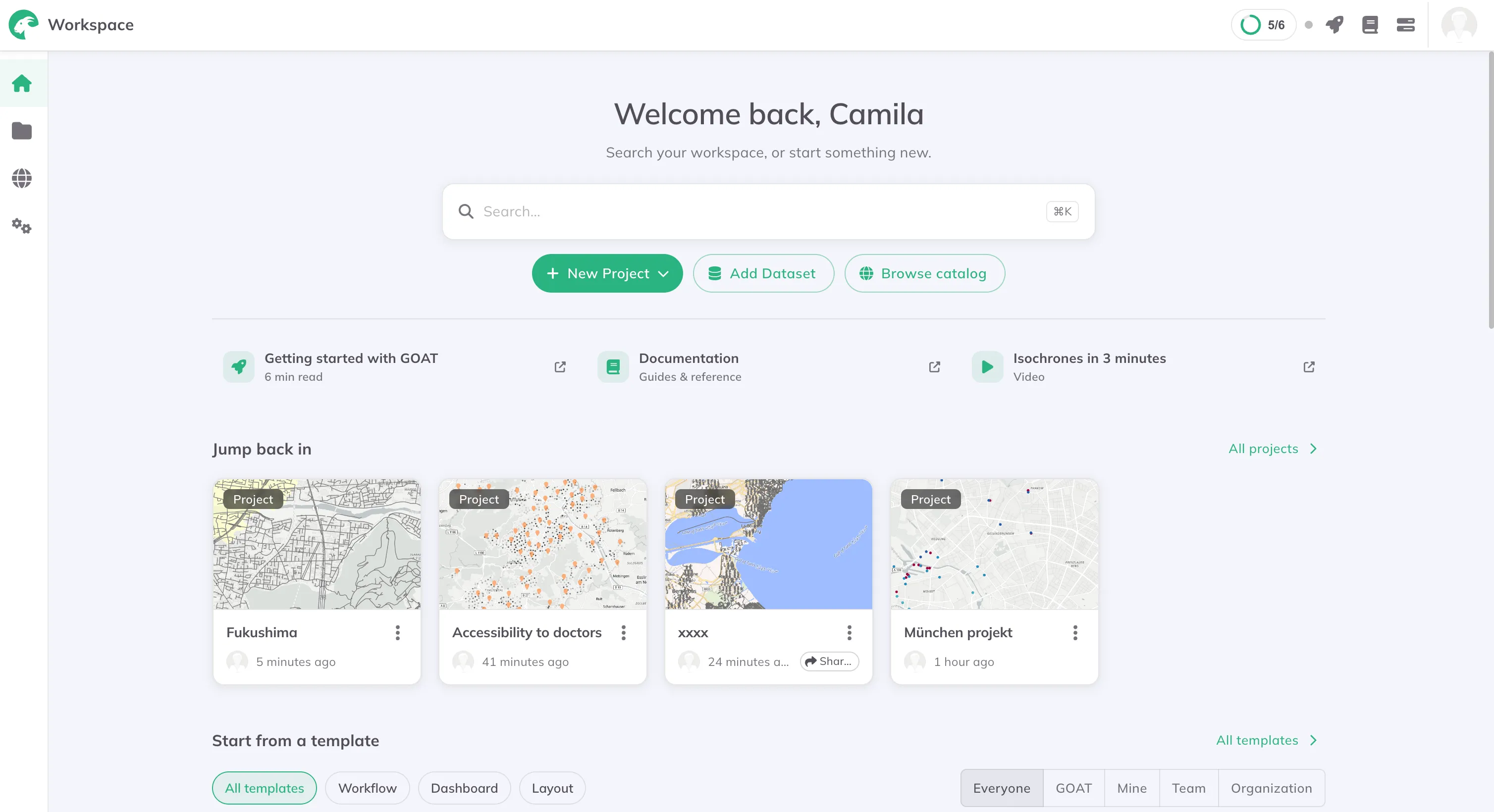
Opening GOAT now starts on a Home screen instead of dropping you straight into an empty map.

It searches the whole workspace from one box, and puts the three things you are most likely to want next in reach: a new project, a dataset, or the Catalog. Underneath, Jump back in lists the projects you had open most recently, and Start from a template offers the workflow, dashboard and layout templates.

Links to the getting-started guide, the documentation and a short isochrones video sit on the same screen, so the first hour with GOAT does not depend on knowing where to look.

The GOAT Home screen: a welcome heading, a workspace search box, buttons for New Project, Add Dataset and Browse catalog, a Jump back in row of recent projects, and a Start from a template section
New14 September 2026

Start from a template instead of an empty map

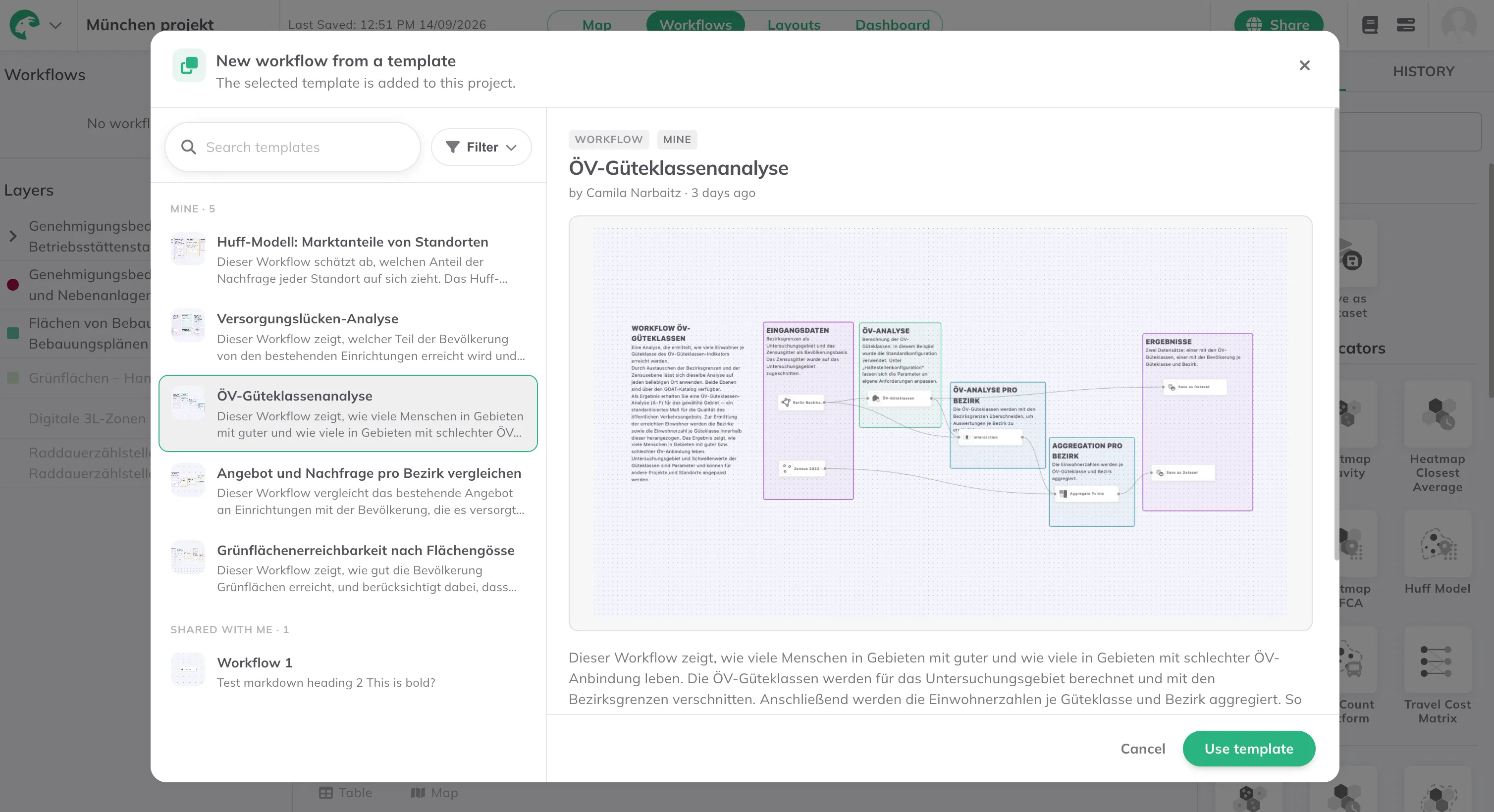
An empty map is a bad place to start, especially in your first hour with a new tool. v3 adds templates at three levels.

A project template opens a prepared project: the layers are styled, the analyses have been run and the Dashboard is built, so you can see how results are meant to be read as well as how they were produced. A workflow template is a prepared analysis where the only thing missing is your data, so ÖV-Güteklassen for your region does not mean building the chain of steps yourself. A layout template is a print-ready map you do not have to design from scratch.

Workflows and Layouts can now be added from inside a project, rather than being separate places you go to.

The New workflow from a template dialogue in GOAT, with the ÖV-Güteklassenanalyse template selected and its diagram shown beside the list
Enhancement14 September 2026

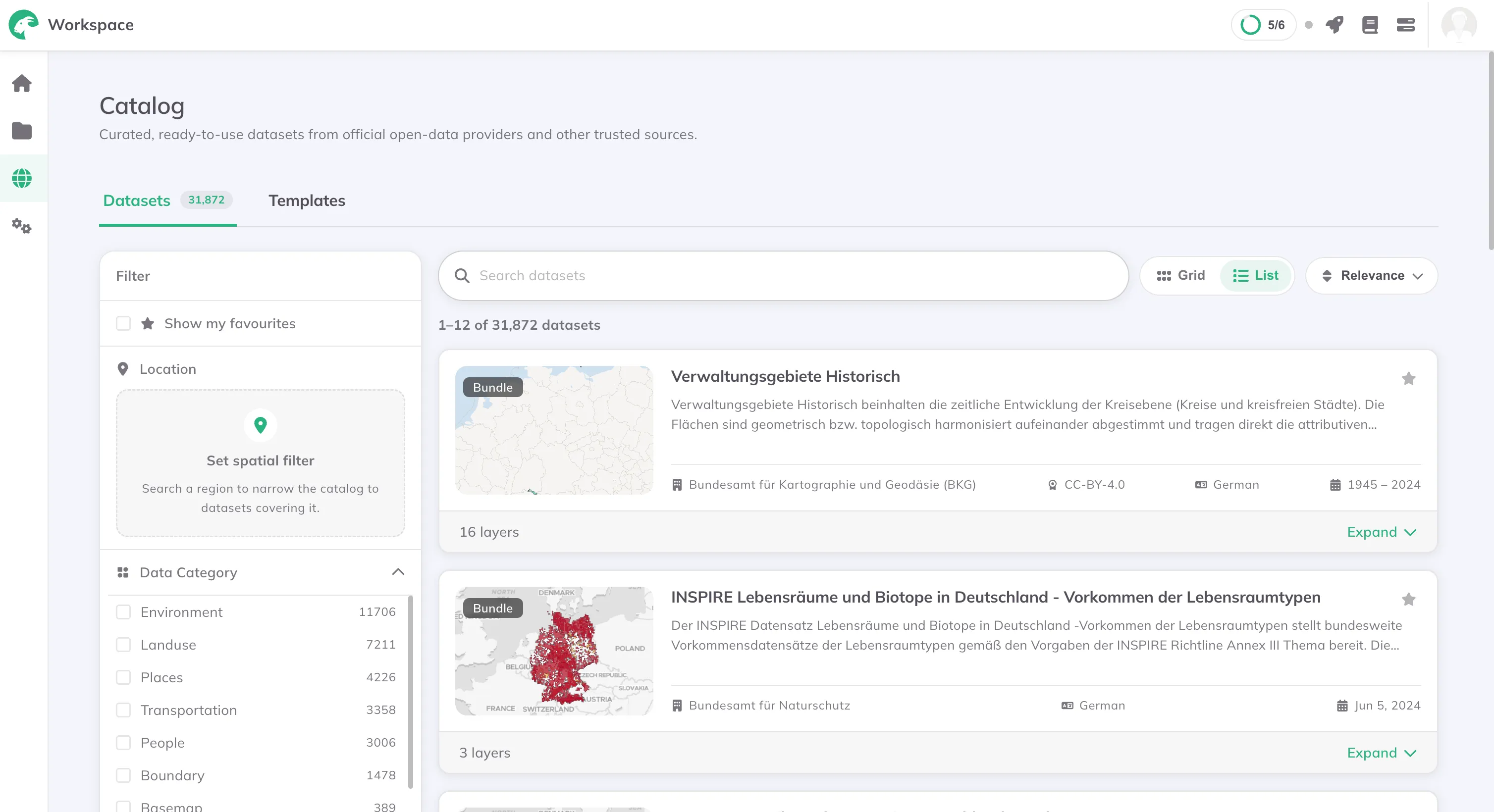
Search more than 30,000 datasets in the Catalog

Until v3 the Catalog held around 60 datasets, each one found, checked and added by hand. It now holds more than 30,000.

They are no longer added one at a time. GOAT collects from public geodata catalogs instead: national open data portals across Europe, regional and municipal portals, Overture Maps and OpenStreetMap. Everything lands in one index, so a dataset from a German state portal and a layer from Overture are described the same way and can be found the same way.

What changes is the first step of a project. Search the Catalog, filter by area, by topic and by data type, and add the dataset to your project. No download, no reprojection, no cleaning.

The Catalog in GOAT listing 31,872 datasets, with filters for location, data category and data type down the left
Enhancement14 September 2026

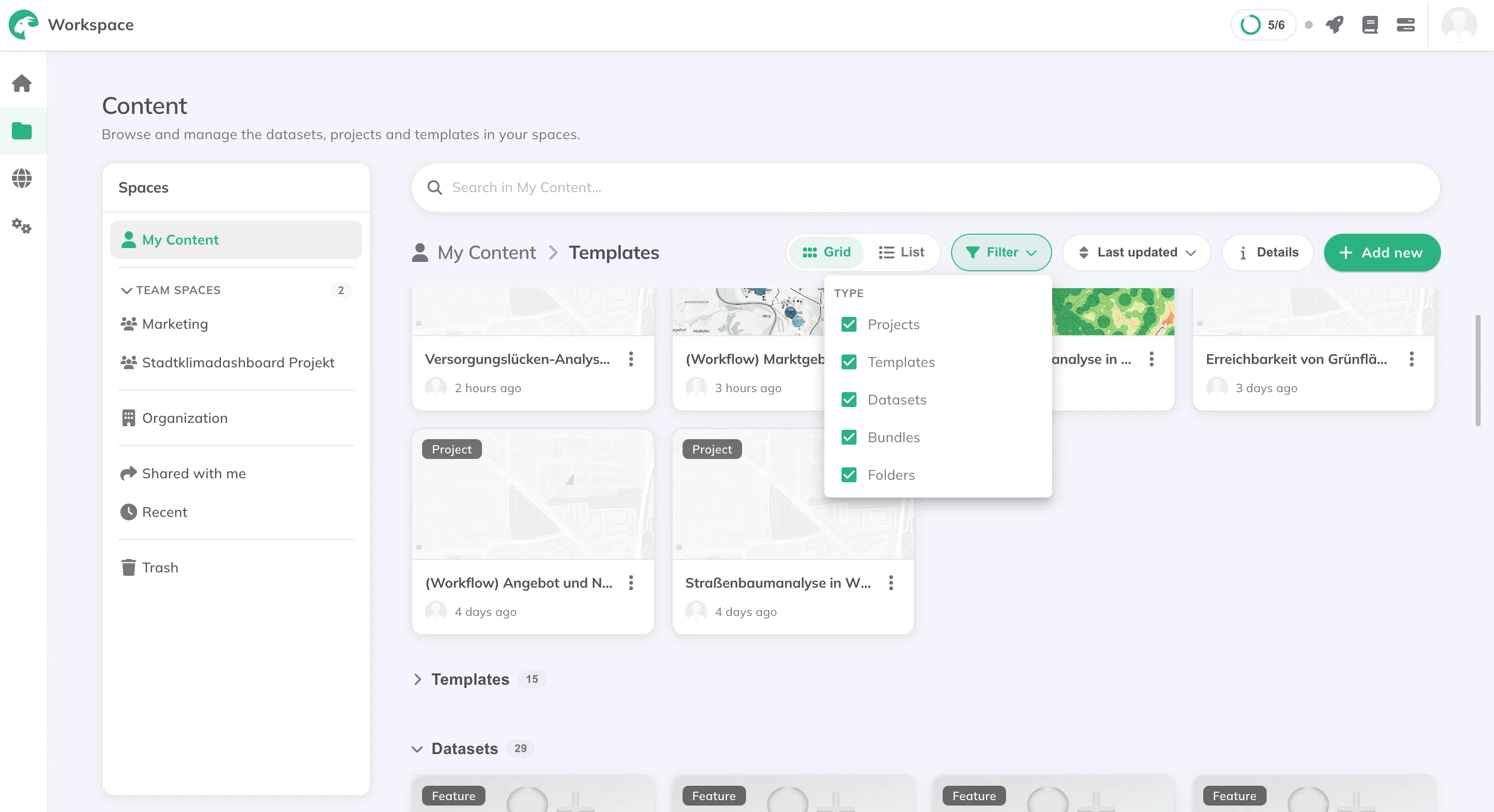
Projects, templates and datasets in one place

Layers, datasets and projects are organised differently now, and the point of the rebuild was to make moving through them easy. Drag and drop to move things, put folders inside folders, and select several items at once to move or delete them together.

More importantly, everything is in one view. Projects, Templates, Datasets, Bundles and Folders sit together and you filter by type to see only what you want. That makes one question much easier to answer than it used to be: which data is connected to which project.

Sharing works across all of it now, not only on projects, and ownership of an item can be transferred to someone else. Useful when a colleague leaves, or when a project moves from the person who built it to the team that runs it.

The GOAT workspace Content view, listing projects, templates and datasets together with the type filter open

Looking for the technical log? github.com/plan4better/goat/releases

Ready to make sense of your data?

Join planners, organizations and cities using GOAT to make better decisions, faster. No GIS expertise needed.